
Creator guide: join and prepare your first goodie
Add Creator to your account, build your public profile, prepare production files, and create your first Goodiee listing.
3 min read
Creator guide · Updated Oct 18, 2026
Before you start
- An account and original work you have the right to publish.
- Production-ready files and accurate images for your first listing.
What you will be able to do
- Enable Creator without a Maker or Supplier application.
- Open your creator workspace and complete a private draft.
- Keep royalties, buyer price, publication, and verification distinct.
Creators provide the original design and production instructions. Adding Creator does not make you a verified maker or supplier, and it does not require owning production equipment.
Step by step
Step 1: Create your account
Open Create account. Enter Email, Password, and First name. Use at least eight characters with uppercase, lowercase, a number, and a symbol, then choose Create account. If you already have an account, use Log in instead.
Create account →Check: You see either the confirmation-email message or role onboarding; do not create a second account to add another role.
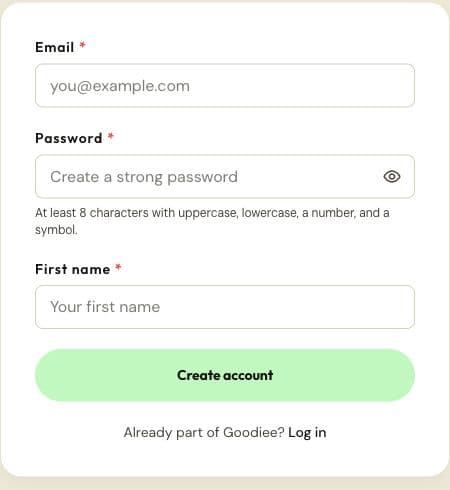
The public account form. One account can later hold multiple roles. Actual site capture · 2026-10-18 · Source screen · Select image to enlarge Step 2: Confirm your email when prompted
Use the confirmation link sent to the address you entered. Return to Goodiee and sign in if needed. A saved signup intent suggests a role; it does not approve a maker or supplier application.
Log in →Check: You can reach your dashboard or the role onboarding screen with your own account.
Step 3: Enable Creator
Open Settings → Roles, select Share designs / Creator, keep Buyer selected, and save your role choices. Maker and Supplier use separate applications; do not select them as a substitute for Creator.
Open this screen →Check: Your account can open creator listings.
Step 4: Build a recognizable profile
Complete your display name, @username, bio, and About information. Add your profile and cover images, choose your appearance, and review the public preview before sharing your profile.
Open this screen →Check: Your public profile identifies your work and its saved links open correctly.
Step 5: Prepare the production package
Use Learn to check the file format, dimensions, scale, supported process, materials, and manufacturing instructions. A buyer image or mockup is not a replacement for the file the maker will manufacture.
Open this screen →Check: The production file and the promised physical result agree.
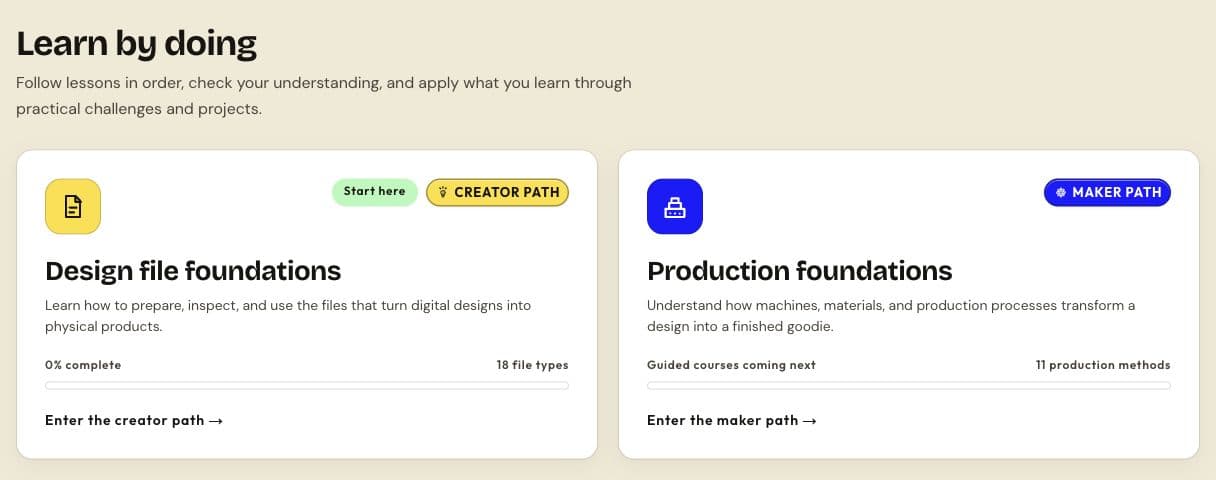
Use the course cards to choose a learning path. Availability labels distinguish released activities from upcoming courses. Actual site capture · 2026-10-18 · Source screen · Select image to enlarge Step 6: Open My listings and start one goodie
Use Create a goodie to open a private draft. The current new-listing flow starts a Goodie product draft; do not assume it opens a separate design-type chooser. Follow the full listing manual to complete each editor section.
Open this screen →Check: You are in your draft editor, not a public marketplace listing.
Step 7: Set earnings and inspect the buyer preview
Enter your intended earnings per unit and read the estimated buyer price shown by the editor. Check the title, options, images, and manufacturing details together. Estimated prices are not a payout guarantee.
Open this screen →Check: The saved draft and buyer preview describe the same goodie.
Step 8: Publish the goodie and handle proof review separately
Use Review and Publish goodie when the listing is complete. The current creator flow validates and publishes a complete goodie directly. Read its resulting status and handle proof-of-work review separately; supplier items use a different submission process.
Open this screen →Check: My listings shows the result actually recorded by the site.
Step 9: Scale carefully with CSV
Once one listing is correct, use the creator CSV importer for additional drafts. It does not upload production files or publish the rows automatically; each imported draft still needs its files, images, and final review.
Open this screen →Check: Each imported row is reviewed as its own draft.
Next guides
Reference this resource
Cite this guide
Use the reference below, or import a file into your reference manager to apply your required citation style.
Goodiee. (October 18, 2026). Creator guide: join and prepare your first goodie. https://goodiee.com/learn/creator-getting-started
Article URL: https://goodiee.com/learn/creator-getting-started